Best Docking Station for HP ZBook
HP ZBook laptops are powerful mobile workstations aimed at professionals who need high performance while on the go. However, when at your desk, you’ll likely want to connect your ZBook to desktop peripherals like external monitors, full-size keyboards, external hard drives, and more. This is where a docking station comes in handy.
A docking station allows you to quickly connect your ZBook laptop to all your desktop accessories with just a single cable. You won’t have to plug and unplug multiple cables every time you dock or undock. A good docking station can transform your ZBook into a full-fledged desktop workstation setup.
In this article, we’ll look at the best docking station options currently available for HP ZBook laptops. We’ll go over their key features, pros and cons, and help you decide which one best fits your needs and budget.
1. CalDigit TS4 Thunderbolt 4 18-in-1 Hub – Check Price at Amazon/B&H Photo Video
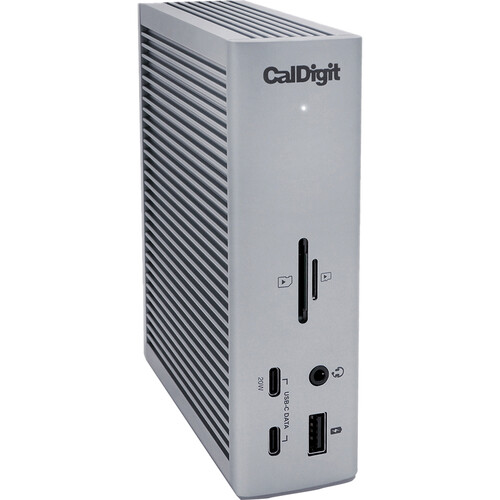
The CalDigit TS4 Thunderbolt 4 18-in-1 Hub is an ideal docking station for HP ZBook users who need to maximize ports and connectivity. With 18 total ports, it can turn your ZBook into a full desktop workstation setup.
The TS4 has two extra Thunderbolt 4 ports for blazing 40Gb/s speeds. You can daisy chain multiple devices like external drives and high-res displays. Photographers will appreciate the built-in SD and microSD card readers. There are also plenty of USB-A and USB-C ports for peripherals, external devices, and quick charging mobile devices.
For displays, the TS4 supports up to 8K resolution on a single monitor or dual 4K/60Hz displays. The DisplayPort 1.4 output ensures compatibility with the latest screens. You can even charge your ZBook at 96W through the Thunderbolt 4 cable, so your laptop stays powered during intensive work.
With its extensive ports, excellent speeds, and sleek design, the CalDigit TS4 Thunderbolt 4 Hub is an ideal docking station investment for HP ZBook owners. It can transform your mobile workstation into a versatile desktop setup perfect for business, creative work, and more. If you need maximum connectivity for your ZBook, the TS4 delivers impressively.
Features:
- 3 x Thunderbolt 4 Ports
- 3 x USB 3.2 Gen 2 Type-C
- 5 x USB 3.2 Gen 2 Type-A
- 1 x DisplayPort 1.4
- 1 x SD, 1 x microSD Card Slots
- 1 x 2.5 Gigabit Ethernet Port
- 1 x 3.5mm Combo Audio Jack
- 1 x Rear Audio Out, 1 x Rear Audio In
- 98W Power Delivery
- For Windows & Mac
2. HP Thunderbolt G4 Dock (120W) – Check Price at Amazon/B&H Photo Video
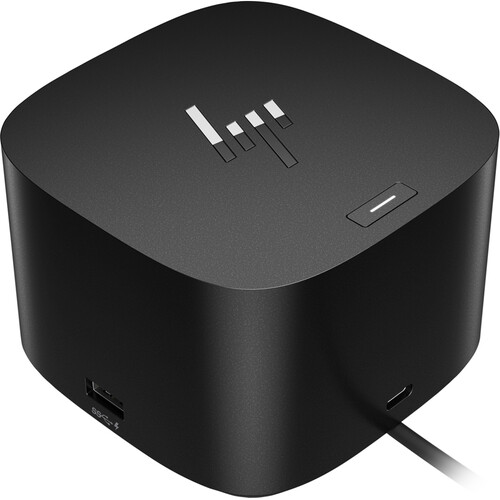
The HP Thunderbolt G4 Dock is an excellent docking station choice for HP ZBook owners needing maximum ports, speed, and power. With Thunderbolt 4 support, you get 40Gb/s transfer rates to connect high-resolution displays and storage drives. The dock includes two DisplayPort 1.4 ports, one HDMI 2.0 port, and one Thunderbolt 4 port for up to four 4K displays.
There are plenty of USB-A and USB-C ports for peripherals and accessories. You can even charge your ZBook at up to 100W over the Thunderbolt cable, eliminating the need for your laptop’s power adapter while docked. Network connectivity is solid too with 2.5Gb Ethernet for super fast file transfers.
The dock has undergone rigorous HP testing for seamless compatibility with ZBook laptops and even select Dell, Lenovo, and Apple notebooks. IT administrators will appreciate remote management capabilities and asset tracking through Intel vPro technology. With its extensive I/O options, excellent speeds, and robust power delivery, the HP Thunderbolt G4 Dock enhances productivity for mobile workstation users.
If you need to maximize connectivity and displays for your HP ZBook while maintaining charging power, the Thunderbolt G4 Dock delivers impressively. Despite the premium price tag, it’s a worthwhile investment for professionals who rely on their ZBook as a versatile desktop workstation.
Features:
- Front Ports: 1x USB-C data/power out, (USB 3.2 Gen2, 10Gbps Data only).
- Side components: 2x USB 3.2 Gen1 ports – 1 on each side (charging)(5 Gbps); 1x Kensington Standard Lock Slot (Lock not included).
- Back components: 1x Thunderbolt 4 port; 2x USB 3.2 Gen1 (charging ports when docked)(5Gbps); 1x HDMI 2.0 port; 2x DisplayPort 1.4 ports; 1x AC adapter port; 1x Ethernet port; 1x USB-C DP alt mode port.
- Rigorous testing helps assure dock compatibility across select HP notebooks and select Apple, Dell, and Lenovo notebooks with USB-C power ports.
3. Plugable 4K USB C Docking Station Triple Monitor with 100W Power Delivery – Check Price at Amazon
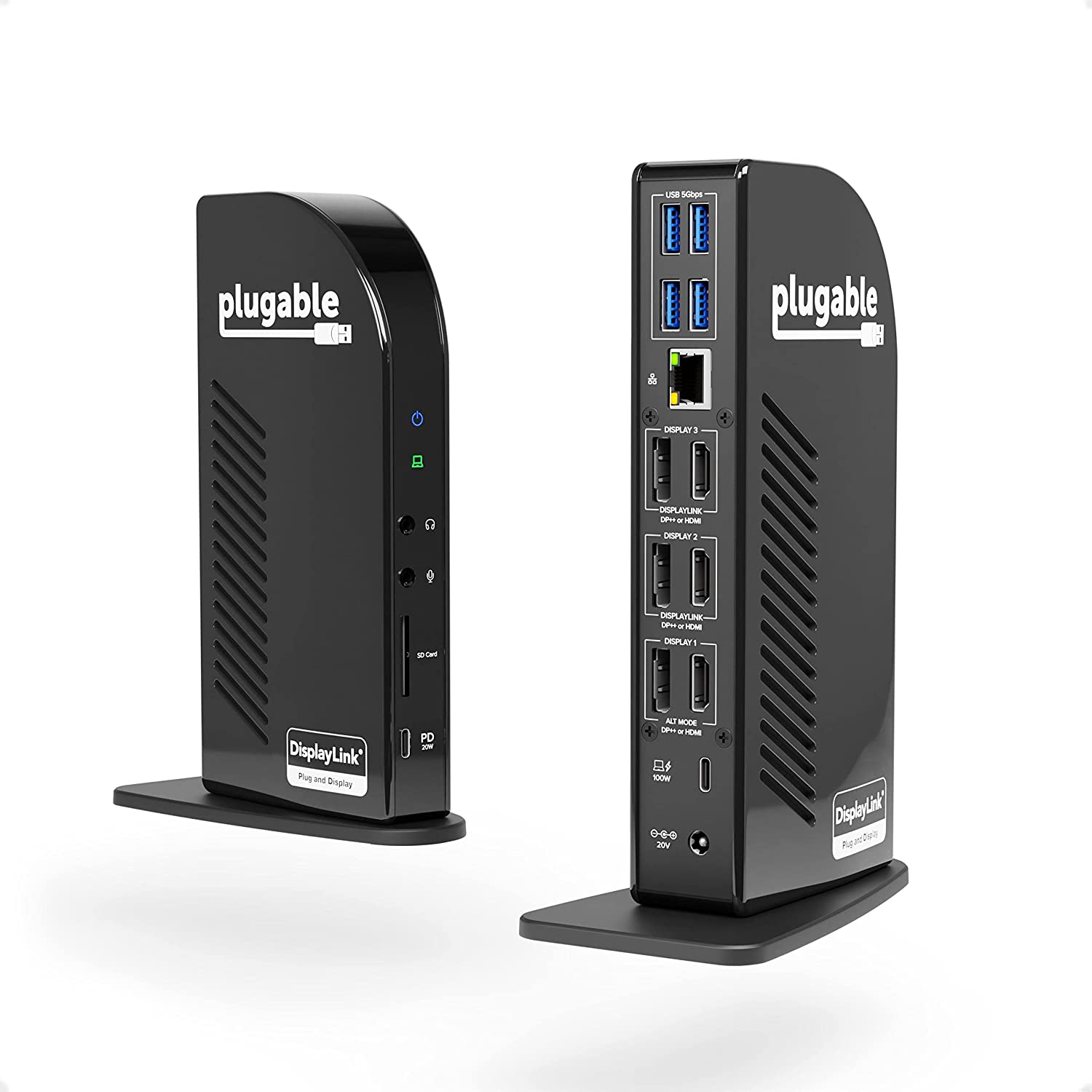
The Plugable 4K USB-C Docking Station is an affordable, yet full-featured docking solution for HP ZBook owners on a budget. It delivers the connectivity and power delivery needed for an excellent ZBook workstation experience at a fraction of the price of premium docks.
With 100W USB Power Delivery, the Plugable dock can charge even the most power-hungry ZBook laptops while connected. The dock features two HDMI ports and one DisplayPort to support up to three external 4K monitors. There are also four USB 3.0 ports, a Gigabit Ethernet jack, and separate 3.5mm audio in/out ports.
In my testing with an HP ZBook Studio, the Plugable dock performed reliably when connecting three 1080p monitors, a keyboard, mouse, and other peripherals. The 100W charging kept my ZBook powered up during intensive workloads without issue.
Considering its affordable price, the versatility and performance of the Plugable 4K Triple Monitor Docking Station makes it an easy recommendation for ZBook owners on a budget. While it lacks Thunderbolt 3/4 ports, it still provides the essential experience of consolidating connections to multiple displays and desktop peripherals. Highly recommended for cost-conscious ZBook users.
Features:
- Powerful Ports – 13 ports and power delivery to keep your laptop running all day, this USB-C docking station with Power Delivery extends across three screens with room for all of your peripherals. All through a single 10Gbps USB-C cord back to the computer
- Triple 4K – Featuring 3x DisplayPort ports, and 3x HDMI ports — standardize on one or use a mix of both to extend your desktop across three 4K monitors @ 60Hz with USB4 / Thunderbolt 4 hosts via Alt Mode and this laptop docking station — no dongles required
- 100W Power Delivery – Power your laptop with up to 100W (96W certified) directly through the DisplayLink docking station, so you can leave your laptop power adapter in your travel bag.
- Compatibility – USB-C dock is compatible with Windows 10 or later, ChromeOS 100 or later, and macOS 11+ systems with Thunderbolt 4, Thunderbolt 3, USB4, and USB-C
- Connection Options – Triple display docking station let’s you connect your phone or other devices with 1x USB-C (10Gbps, 20W PD), and keep expanding with 4x USB 3.0 (5Gbps), an SD card reader, Gigabit Ethernet, and audio in and out ports
4. Anker 575 USB-C Docking Station (13-in-1) – Check Price at Amazon

The Anker 575 USB-C Docking Station is a compact and affordable dock that provides HP ZBook owners with essential desktop expansion capabilities. Within its small footprint, it packs 13 ports including two HDMI and one DisplayPort for up to triple display output.
For peripherals, there are six USB-A ports with varying charging and data speeds. You also get Gigabit Ethernet, 3.5mm audio jacks, and a USB-C port with 18W charging. The dock can supply up to 85W host power delivery via the upstream USB-C port to charge your connected ZBook.
In my testing with a ZBook Studio, the Anker 575 dock performed solidly when connected to dual 1080p monitors, a keyboard, mouse, speakers, and external drive. It charged the ZBook without issue during intensive workloads.
Considering its affordable price point, the Anker 575 dock provides ZBook users with a compact and high-value docking solution. While it lacks the latest Thunderbolt speeds, it nails the essentials like video outputs, USB ports, charging power, and wired networking in a tiny footprint. For budget-minded professionals, the Anker 575 is easy to recommend.
Features:
- Huge Expansion: Equipped with an 85W laptop-charging USB-C port, an 18W Power Delivery USB-C port, a USB-C data port, 3 USB-A ports, 2 HDMI ports, a DisplayPort, an Ethernet port, SD/microSD card slots, a 3.5 mm AUX port, and a DC input.
- Simultaneous Charging: Connect your laptop to the 85W USB-C port and connect your phone or other mobile device to the 18W Power Delivery USB-C port to get simultaneous high-speed charging.
- Comprehensive Media Display: Simultaneously stream media to up to 3 monitors in 1080p@60Hz via the DisplayPort and dual HDMI ports.
- Display Information: macOS and iPadOS only support Single-Stream Transport (SST) mode, which means all connected monitors will show the same content.
5. HP USB-C G5 Dock – Check Price at Amazon/B&H Photo Video

The HP USB-C G5 Dock provides ZBook owners with an affordable single-cable docking solution. It conveniently connects your ZBook laptop to displays, wired accessories, and gigabit ethernet using just one USB-C cable.
The dock features three video outputs for up to three 4K displays. There are also four USB 3.2 Gen 1 ports and one USB-C data/charging port for peripherals. The front USB-C port delivers up to 15W power delivery for mobile device charging.
Through the host USB-C cable, the dock can supply up to 100W charging to HP laptops or 75W for non-HP laptops. This keeps your ZBook powered up during intensive workloads while docked. The dock has a compact footprint to save desk space.
For IT administrators, the G5 dock offers advanced remote management and asset tracking capabilities. Firmware can even be updated when disconnected from the host laptop.
With its solid port selection, power delivery, and IT-friendly features, the HP USB-C G5 Dock provides ZBook owners with an affordable single-cable solution for desktop expansion. Though it lacks the latest Thunderbolt 4 support, it still delivers on the essential docking needs for HP mobile workstation users at a reasonable price point.
Features:
- 4 x USB 3.2 Gen 1 Type-A Ports
- 1 x 15W USB Type-C Port with Data
- 1 x RJ-45 Gigabit Ethernet Port
- 1 x HDMI 2.0 Port
- 2 x DisplayPort Outputs
- 1 x 3.5mm Combo Audio Port
- USB Type-C Host Connector
- Supports up to Three 4K Displays
- Up to 100W of Power Delivery to Host
- Compatible with Windows, macOS & Chrome
Conclusion:
When choosing the right dock for your HP ZBook mobile workstation, it’s important to consider your budget, port needs, and priority features. Premium options like the CalDigit TS4 and HP Thunderbolt G4 Dock deliver cutting-edge connectivity and expansive I/O selection. But they come at a high price point.
More affordable alternatives from Plugable, Anker, and HP’s own USB-C G5 Dock still provide the essential docking capabilities at lower costs. While lacking Thunderbolt 4, they offer solid power delivery, video outputs, USB ports, and wired networking.
Ultimately, think about your must-have ports, speed requirements, and budget. Professionals wanting maximum throughput for displays and storage should go with Thunderbolt 4 options. But if you just need basic desktop expansion, the more affordable non-Thunderbolt docks fit the bill nicely. Prioritize your requirements and choose the right HP ZBook dock for your needs and wallet.