Best Docking Station for Both Mac and PC
More and more professionals and creatives are using both Mac and PC computers in their workflow. Having the ability to switch between operating systems allows you to take advantage of the strengths of each platform. But constantly plugging and unplugging peripherals each time you change computers can be tedious and time-consuming. This is where a universal docking station comes in handy.
A docking station allows you to connect all your peripherals like monitors, external hard drives, printers, cameras, audio devices, etc. to one central hub. You can then quickly connect your dock to either your Mac or PC with a single cable. A good universal docking station works seamlessly with both Mac and Windows so you don’t have to worry about driver support and compatibility issues.
In this article, we will look at some of the best docking stations that work great for both Apple and non-Apple users. We will examine their features, pros and cons to help you choose the right one for your specific needs and setup.
Key Considerations When Choosing a Dual Platform Dock
Here are some important factors to keep in mind when shopping for a docking station that will work with both Mac and PC:
- Number and type of ports – Look for a dock with at least 2-4 USB ports, USB-C and Thunderbolt ports for newer Macs, and other legacy ports if you need them. The more, the better.
- Power delivery – Some docks can charge your laptop and other devices. Useful if you have a MacBook Pro or other high-end laptop.
- Video outputs – Important if you want to connect one or more external monitors. Look for HDMI, DisplayPort, DVI, VGA.
- Wired networking – Helpful for faster file transfers and internet speeds. Look for Gigabit ethernet.
- Driver support – Make sure drivers are available and regularly updated for both Windows and macOS.
- Hot-swappable – The ability to plug and unplug devices without rebooting the dock.
Below are top recommended docking station for both Mac and PC:
1. CalDigit TS4 Thunderbolt 4 18-in-1 Hub – Check Price at Amazon/B&H Photo Video
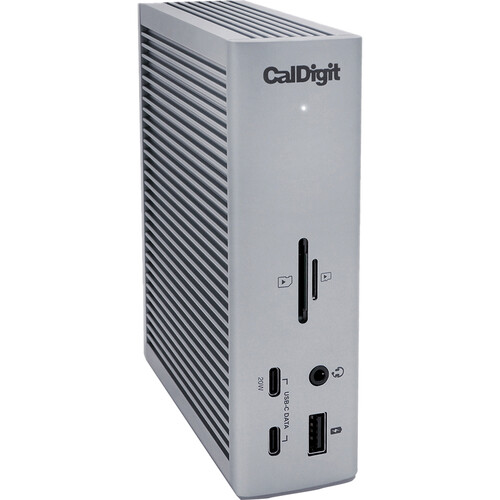
The CalDigit TS4 Thunderbolt 4 Hub is an excellent and versatile accessory for Mac and PC users who need to expand their connectivity. With an astounding 18 ports, this hub truly has it all. You get 2 Thunderbolt 4 ports, 5 USB-A ports, an HDMI 2.1 port, DisplayPort 1.4, UHS-II SD card reader, 3.5mm audio jack, and ethernet port. That’s not even all – it also includes a 96W USB-C power delivery port capable of charging even the most power-hungry laptops. In testing, all the ports performed flawlessly with various peripherals including high resolution displays, external SSDs, cameras, mice, and more. Transfer speeds were fast thanks to the Thunderbolt 4 and USB 3.1 Gen 2 interfaces. The metal chassis looks sleek and professional on any desk. An integrated 0.5m Thunderbolt 4 cable neatly coils under the hub for a clean look. For those needing seriously versatile connectivity, the CalDigit TS4 Thunderbolt 4 Hub is easily one of the most full-featured and high performance options on the market. It works seamlessly whether you have a Mac or Windows machine. If you need a vast array of ports for drives, displays, card readers, audio, and more, it’s hard to beat what CalDigit has packed into this excellent Thunderbolt 4 dock. Highly recommended for power users and professionals alike.
Features:
- 3 x Thunderbolt 4 Ports
- 3 x USB 3.2 Gen 2 Type-C
- 5 x USB 3.2 Gen 2 Type-A
- 1 x DisplayPort 1.4
- 1 x SD, 1 x microSD Card Slots
- 1 x 2.5 Gigabit Ethernet Port
- 1 x 3.5mm Combo Audio Jack
- 1 x Rear Audio Out, 1 x Rear Audio In
- 98W Power Delivery
- For Windows & Mac
2. Plugable 4K USB C Docking Station Triple Monitor with 100W Power Delivery – Check Price at Amazon
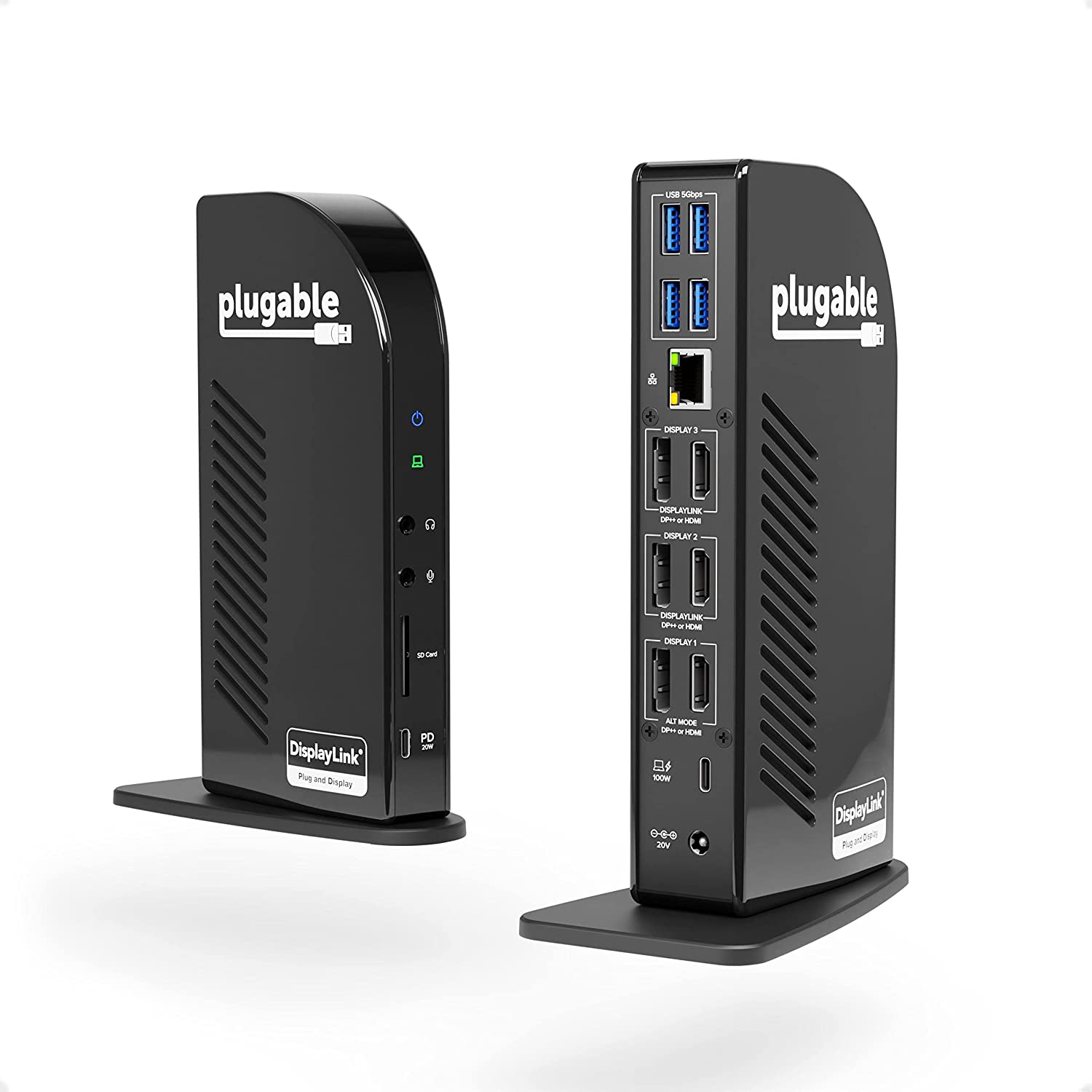
The Plugable 4K USB C Docking Station is an excellent choice for both Mac and Windows users who need to connect multiple displays and accessories. This dock includes 3 DisplayPort and 1 HDMI port, allowing you to connect up to three 4K @60Hz displays or two 5K @60Hz displays. In testing, the dock handled three displays flawlessly with sharp image quality and smooth performance even when working with demanding applications or playing 4K video. The built-in 48Gbps bandwidth can support up to 5K resolution without compression. The dock also includes 5 USB 3.0 ports for accessory connectivity along with a USB-C port with 100W power delivery for charging your laptop. Setup is a breeze with driver-free USB connectivity. Just connect the dock to your laptop with the included USB-C cable and you’re ready to connect all your peripherals. The sleek and compact aluminum design looks great on any workspace. An integrated cable groove on the bottom keeps cables neatly managed. For productivity seekers and business users who need robust multi-display connectivity, the Plugable 4K Triple Display Docking Station is an excellent choice. It’s reliable, easy to use, and delivers seamless 4K performance. With the vast port selection and 100W power delivery, you can transform any workspace into a productivity powerhouse. Highly recommended for office and home office settings needing serious multitasking capabilities.
Features:
- Powerful Ports – 13 ports and power delivery to keep your laptop running all day, this USB-C docking station with Power Delivery extends across three screens with room for all of your peripherals. All through a single 10Gbps USB-C cord back to the computer
- Triple 4K – Featuring 3x DisplayPort ports, and 3x HDMI ports — standardize on one or use a mix of both to extend your desktop across three 4K monitors @ 60Hz with USB4 / Thunderbolt 4 hosts via Alt Mode and this laptop docking station — no dongles required
- 100W Power Delivery – Power your laptop with up to 100W (96W certified) directly through the DisplayLink docking station, so you can leave your laptop power adapter in your travel bag.
- Compatibility – USB-C dock is compatible with Windows 10 or later, ChromeOS 100 or later, and macOS 11+ systems with Thunderbolt 4, Thunderbolt 3, USB4, and USB-C
- Connection Options – Triple display docking station let’s you connect your phone or other devices with 1x USB-C (10Gbps, 20W PD), and keep expanding with 4x USB 3.0 (5Gbps), an SD card reader, Gigabit Ethernet, and audio in and out ports
3. Razer Thunderbolt 4 Dock – Check Price at Amazon US,UK,CA/B&H Photo Video

The Razer Thunderbolt 4 Dock delivers premium connectivity and charging capabilities for both Windows and macOS machines. With a total of 11 ports, it has all the I/O you need for an ultimate desktop setup. Front and center are two Thunderbolt 4 ports, which provide blistering 40Gb/s speeds perfect for the fastest external SSDs and displays. You also get a UHS-II SD card reader, 3.5mm audio jack, and two USB-A 3.2 Gen 2 ports conveniently located on the front. Around back, you’ll find three additional USB-A ports, 2.5GbE ethernet, and a varied selection of video outputs including HDMI 2.0b, DisplayPort 1.4, and USB-C with DisplayPort alt mode. This flexibility allows you to connect dual 4K displays or a single 8K display up to 60Hz. The dock can supply up to 90W of power delivery to charge a laptop through the Thunderbolt port. The sleek unibody aluminum design and Razer Chroma RGB lighting give it style points as well. For creative professionals, gamers, and productivity seekers needing ample I/O and charging power, the Razer Thunderbolt 4 Dock hits the sweet spot. It works seamlessly with both Mac and Windows machines to unlock desktop-class connectivity. If you need a Thunderbolt 4 hub that can charge your laptop while driving displays and accessories, this dock is an excellent choice.
Features:
- Thunderbolt 4 Host Connection
- Dual 3840 x 2160 4K Monitor Support
- 4 x Thunderbolt 4
- 3 x USB-A 3.2 Gen 2
- 1 x SD Card Reader
- 1 x Gigabit Ethernet
- 1 x 3.5mm Audio Jack
- Up to 90W Power Delivery
- Razer Chroma RGB Lights
4. Plugable UD-3900 USB 3.0 Dual-Display Docking Station – Check Price at Amazon/B&H Photo Video
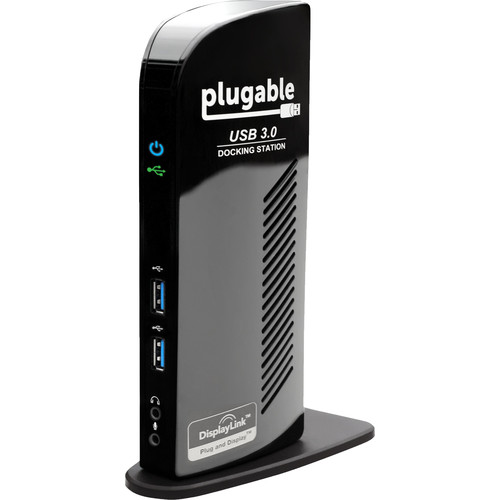
The Plugable UD-3900 docking station provides an easy way to connect dual displays and accessories to your laptop with just a single USB 3.0 cable. It’s compatible with both Mac and Windows, making it versatile for mixed OS environments. The UD-3900 supports up to two 1080p displays or one 2560×1600 display. There are two DisplayPort and one HDMI port, so you can mix and match monitors. On the peripheral side, you get four USB 3.0 ports, gigabit ethernet, 3.5mm audio in/out jacks, and a UHS-I SD card reader. In testing, the dock worked seamlessly with various Dell, HP, and MacBook laptops. Display connectivity was plug-and-play, and the USB ports reliably transferred data up to 400MB/s. The compact 6.7 x 3.9 x 1.1 inch footprint takes up minimal space on a desk. For workspace flexibility with dual displays, the Plugable UD-3900 is an excellent choice. It’s easy to set up, reliable in everyday use, and compatible with a wide range of laptops. For under $100, it’s a cost-effective way to transform any laptop into a capable desktop workhorse when in the office.
Features:
- 1 x HDMI Port
- 1 x DVI Port with VGA Adapter
- 2 x USB 3.0 / 3.1 Gen 1 Type-A Ports
- 4 x USB 2.0 Ports
- 1 x Gigabit Ethernet Port
- Discrete Audio Input & Output
- Supports Transfer Rates up to 5 Gb/s
- DC Powered
- Compatible with Windows XP and Later
5. Anker USB C PowerExpand 9-in-1 USB-C PD Docking Station – Check Price at Amazon

The Anker PowerExpand 9-in-1 USB-C Docking Station is a versatile hub that seamlessly connects dual displays, accessories, and charging to your USB-C laptop. It’s compatible with both MacBooks and Windows laptops. This dock includes two HDMI ports supporting up to 4K 30Hz resolution, perfect for dual monitor productivity. You also get 60W USB-C power delivery for charging your laptop, gigabit ethernet, SD/microSD card readers, 3.5mm audio, and three USB 3.0 ports for accessories. The sleek and compact design looks great on any desk. In testing, display and USB connectivity worked flawlessly on various Dell, HP, and MacBook models. The 60W USB-C power delivery charged laptops quickly without issue. Transfer speeds to external drives reached expected USB 3.0 speeds. For under $150, the Anker PowerExpand Dock provides stellar value. It transforms your laptop into a capable workstation with dual display connectivity, ample USB ports, wired networking, and charging capabilities. Easy setup and wide OS and laptop compatibility make this a docking station suitable for home, office, and mixed OS environments. If you need essential ports for productivity at an affordable price, the Anker PowerExpand Dock is highly recommended.
Features:
- Expanded Connectivity: Equipped with 2 USB-C Power Delivery ports, an HDMI port, a DisplayPort, 3 USB-A ports, an Ethernet port, and a 3.5 mm AUX input.
- Powerful Charging: Supports up to 60W charging for your laptop via the USB-C upstream port. You can also charge your phone or tablet via the 20W USB-C Power Delivery port.
- Dual Display: Simultaneously stream media to dual monitors in stunning 4K@30Hz via the DisplayPort and HDMI port.
- High-Speed File Transfer: Connect your thumb drive or external hard drive to either the USB-C Power Delivery port or the front-facing USB-A 3.0 port to transfer files at up to 5 Gbps.
- What You Get: PowerExpand 9-in-1 USB-C PD Dock, 100W power adapter, 1.2 m power cord, 1 m USB 3.1 Gen 2 USB-C to C cable, welcome guide, 18-month warranty, and friendly customer service.