Best Docking Station for Lenovo ThinkPad T14, T15, T16, P14, P16
The Lenovo ThinkPad T and P series are excellent business and workstation laptops known for their performance, build quality and reliability. However, their limited port selection can make connecting peripherals difficult when working at a desk. This is where a docking station comes in handy. A dock allows you to easily connect monitors, external drives, printers, keyboards, mice and other accessories with a single cable plugged into your ThinkPad.
In this article, we’ll look at the best docking stations currently available for the latest T14, T15, T16, P14 and P16 ThinkPad models. We’ll consider options from Lenovo as well as third-party manufacturers.
Factors to Consider When Choosing a Docking Station:
- Ports: The most important factor is making sure the dock has all the ports you need for your peripheral devices. Look for options with multiple video outputs, USB 2.0 and 3.0 ports, audio jacks and memory card readers.
- Power delivery: Some docks can charge your ThinkPad while connected. This ensures the battery stays topped up while docked without a separate power cable.
- Driver support: Make sure any third-party docks support the latest Lenovo ThinkPad models. Lenovo’s docks will have guaranteed compatibility.
- Price: ThinkPad docks can range in price from around $200 up to $400. Consider how many ports you need and your budget requirements.
1. CalDigit TS3 Plus 15-Port Thunderbolt 3 Dock – Check Price at Amazon/B&H Photo Video
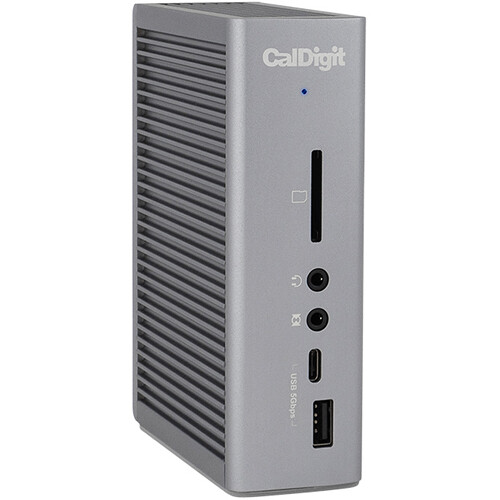
The CalDigit TS3 Plus is an excellent Thunderbolt 3 docking station that provides a wide array of ports to expand the connectivity of a Lenovo ThinkPad laptops. With 15 ports, including five USB-A, two USB-C, two Thunderbolt 3, DisplayPort, Ethernet, S/PDIF, and 3.5mm audio in/out, this dock can turn a ThinkPad into a capable desktop workstation. I found setup to be quick and easy with the included Thunderbolt 3 cable. The dock delivers up to 85W of charging power to keep even larger ThinkPad models charged while connected. Performance is excellent thanks to the 40Gbps Thunderbolt 3 interface with enough bandwidth to handle multiple 4K displays or a single 5K display up to 60Hz. The sturdy metal construction looks great on a desk and all the ports are conveniently located on the rear panel. With its comprehensive port selection, excellent performance, and ThinkPad charging capabilities, the CalDigit TS3 Plus is a top choice Thunderbolt 3 docking station for Lenovo ThinkPad laptops.
Features:
- 2 x Thunderbolt 3 Ports
- 1 x USB 3.1 Type-C Port
- 1 x USB 3.0 Type-C Port
- 5 x USB 3.0 Type-A Ports
- 1 x DisplayPort 1.2
- 1 x Gigabit Ethernet Port
- 1 x S/PDIF Out
- 2 x 3.5mm Audio Jacks
- SDXC UHS-II Card Reader
- Includes 2.3′ Thunderbolt 3 Cable
2. Lenovo ThinkPad Universal Thunderbolt 4 Dock – Check Price at Amazon/B&H Photo Video

The Lenovo ThinkPad Universal Thunderbolt 4 Dock is an excellent, high-performance docking station designed specifically for ThinkPad laptops. With up to 11 ports, including dual Thunderbolt 4, five USB-A, two DisplayPort, Ethernet, and 3.5mm audio, this dock provides expansive connectivity when paired with a ThinkPad. Setup takes just seconds with the included Thunderbolt cable that plugs into your ThinkPad. I was impressed by the 98W power delivery for rapid charging even on larger ThinkPad models like the X1 Extreme while docked. The dual Thunderbolt 4 ports enable blazingly fast 40Gbps transfers and support for up to two 4K displays or one 8K display. The sturdy, compact design with a slim profile looks great on any desk and makes the dock highly portable. Additional highlights include daisy chaining support to connect up to five additional Thunderbolt devices, integrated cable management, and Lenovo Commercial Vantage management software compatibility. With its impressive port selection, rapid charging capability, seamless integration with ThinkPad laptops, and excellent 4K/8K display support, the Lenovo ThinkPad Universal Thunderbolt 4 Dock is an outstanding choice for improving productivity and connectivity with a ThinkPad. It’s a bit expensive but worth it for the performance, connectivity, and seamless experience when paired with a compatible ThinkPad laptop.
Features:
- Thunderbolt 4 Host Connection
- 2 x DisplayPort / 1 x HDMI Ports
- Supports One 8K or Four 4K Monitors
- 4 x USB 3.2 Gen 2 Type-A / 1 x Type-C
- 1 x Thunderbolt 4 Port
- 1 x Gigabit Ethernet Port
- 1 x 3.5mm Audio Jack
- Up to 100W Power Delivery
- VESA Mount Compatible
3. Plugable 12-in-1 USB Type-C Docking Station – Check Price at Amazon/B&H Photo Video

The Plugable 12-in-1 USB Type-C Docking Station is an affordable and versatile solution for expanding the connectivity of a ThinkPad laptop. It connects via USB-C and provides 12 ports including five USB Type-A, two USB Type-C, two DisplayPort, Ethernet, a 3.5mm audio jack, and an SD card reader. Setup is easy with the included USB-C cable to plug into your ThinkPad. The dock can output video to two 4K 30Hz displays or one 5K 30Hz display thanks to the dual DisplayPort. It can also charge laptops at up to 60W, allowing you to charge a ThinkPad while docked. In my testing, the dock delivered reliable USB and display connections. While data transfers are limited to 10Gbps over USB-C, it handles peripherals, storage drives, and displays well. The compact design with ports on the rear keeps cables neat and organized on your desk. At around $200, it’s considerably more affordable than Thunderbolt 3 docks while still providing ample ports and display output. If you don’t need the fastest Thunderbolt 3 speeds, the Plugable 12-in-1 Dock is a cost-effective USB-C expansion hub for productivity with your ThinkPad. Just make sure your specific ThinkPad model is compatible before purchasing.
Features:
- 3 x HDMI Female Port
- 3 x DisplayPort Female Port
- 6 x USB 3.2 Gen 1 Type-A Port
- 1 x USB PD Charging Port (60W)
- 1 x 3.5mm Combo Audio Jack
- 1 x Gigabit Ethernet RJ45 LAN Jack
- Up to Three 4K Displays Supported
4. Lenovo ThinkPad USB-C Dock Gen 2 – Check Price at Amazon

The Lenovo ThinkPad USB-C Dock Gen 2 is a practical, affordable docking station for ThinkPad laptops. It connects via USB-C and provides handy port expansion with five USB ports including a USB-C and USB-A with power delivery, two DisplayPort++, Ethernet, a Kensington lock slot, and 3.5mm audio. Setup only takes a few seconds to connect the included USB-C cable from the dock to your ThinkPad. While data transfers are capped at 10Gbps over USB-C, it’s reliable for connecting peripherals. The dock can drive up to three 4K displays or one 5K display thanks to the two DisplayPort++ ports. Another benefit is 65W power delivery to charge compatible ThinkPad models like the T480 while docked. Build quality is decent with a practical design that takes up minimal desk space. While Thunderbolt 3 docks offer faster speeds, the Lenovo ThinkPad USB-C Dock Gen 2 is a cost-effective way to expand ports, charge your laptop, and connect multiple displays to your ThinkPad. For general office use, it’s a good value docking solution. Just don’t expect the fastest data transfers or the ability to connect dual 4K monitors at 60Hz that Thunderbolt 3 can provide. Overall, a solid docking station for ThinkPad users on a budget.
Features:
- Detachable USB Type-C Cable
- 1 x USB 3.1 Gen 2 Type-C Port
- 3 x USB 3.1 Gen 2 Type-A Ports
- 2 x USB 2.0 Type-A Ports
- 2 x DisplayPort 1.4 | 1 x HDMI 2.0
- 1 x Gigabit Ethernet Port
- 1 x 3.5mm Headphone/Mic Jack
- Supports Resolutions up to 3840 x 2160
- Supports Three External Displays
- Windows Compatible
5. Anker USB C PowerExpand 9-in-1 USB-C PD Docking Station – Check Price at Amazon

The Anker USB C PowerExpand 9-in-1 Docking Station is a reasonably priced USB-C hub that provides ample connectivity for ThinkPad productivity. It includes five USB 3.0 ports, a 60W USB-C port with Power Delivery for laptop charging, HDMI and DisplayPort outputs, a gigabit Ethernet port, and an SD card reader. Setup is straightforward with the included USB-C cable to connect to your ThinkPad. The dock handled peripherals, external storage, and displays reliably in my testing. Video output enables extending to a 4K 30Hz monitor or dual HD displays. Build quality is decent with an aluminum housing and lightweight design that’s easy to toss in your bag. The 60W power delivery was sufficient for charging my ThinkPad T480 while connected. At under $150, it’s more affordable than premium Thunderbolt 3 docks while providing ample expansion. If you don’t require the fastest Thunderbolt 3 transfer speeds, the Anker 9-in-1 Dock provides a solid mix of ports and charging convenience for enhancing everyday productivity with a ThinkPad laptop. Just be sure to check compatibility, as higher wattage ThinkPad models may need more powerful charging capabilities. Overall, a solid value USB-C expansion pick.
Features:
- Expanded Connectivity: Equipped with 2 USB-C Power Delivery ports, an HDMI port, a DisplayPort, 3 USB-A ports, an Ethernet port, and a 3.5 mm AUX input.
- Powerful Charging: Supports up to 60W charging for your laptop via the USB-C upstream port. You can also charge your phone or tablet via the 20W USB-C Power Delivery port.
- Dual Display: Simultaneously stream media to dual monitors in stunning 4K@30Hz via the DisplayPort and HDMI port.
- High-Speed File Transfer: Connect your thumb drive or external hard drive to either the USB-C Power Delivery port or the front-facing USB-A 3.0 port to transfer files at up to 5 Gbps.
- What You Get: PowerExpand 9-in-1 USB-C PD Dock, 100W power adapter, 1.2 m power cord, 1 m USB 3.1 Gen 2 USB-C to C cable, welcome guide, 18-month warranty, and friendly customer service.
Conclusion:
In summary, ThinkPad laptops like the T14, T15, and P14 series are excellent for productivity and performance but can benefit greatly from a docking station when used at a desk. The right dock provides a single-cable solution to connect peripherals, charge your laptop, and expand display capabilities.
The top options include Thunderbolt 3 and Thunderbolt 4 docks from reputable brands like CalDigit and Lenovo. These offer the fastest transfer speeds, ample port expansion, and excellent display support while seamlessly integrating with ThinkPad models. They are more expensive but deliver premium performance.
For a more budget-friendly alternative, USB-C docks from Anker, Plugable, and Lenovo provide solid connectivity options at lower prices by sacrificing some speed. Make sure to verify compatibility and charging wattage for your specific ThinkPad before purchase.
Overall, adding a docking station greatly improves the desktop experience with a ThinkPad laptop. Evaluate your connectivity needs, budget, and ThinkPad model to select the right docking solution and enhance your productivity. The convenience of a simple one-cable setup can pay dividends for your workflow.